ADR 007: Educational Workflow Architecture
Status
Evolving (This is a living document that will be updated as implementation progresses)
Context
The FeedForward application centers around a structured educational workflow that consists of several interconnected components: courses, assignments, submissions, and feedback. These components form a hierarchical relationship and have distinct lifecycle states that affect each other.
As we implement each component of this educational workflow, we need to define:
- The relationships between these components
- How status changes in one component affect related components
- The permission model across different roles
- How configuration options at each level affect the behavior of child components
- The lifecycle management of each component in accordance with ADR-002 (Data Lifecycle Management)
Decision
We have decided to implement a comprehensive educational workflow architecture with the following design:
1. Hierarchical Component Structure
Instructor
   |
   +--> Course
          |
          +--> Assignment
                 |
                 +--> Submission (Student Draft)
                        |
                        +--> Feedback
                               |
                               +--> Aggregated Feedback
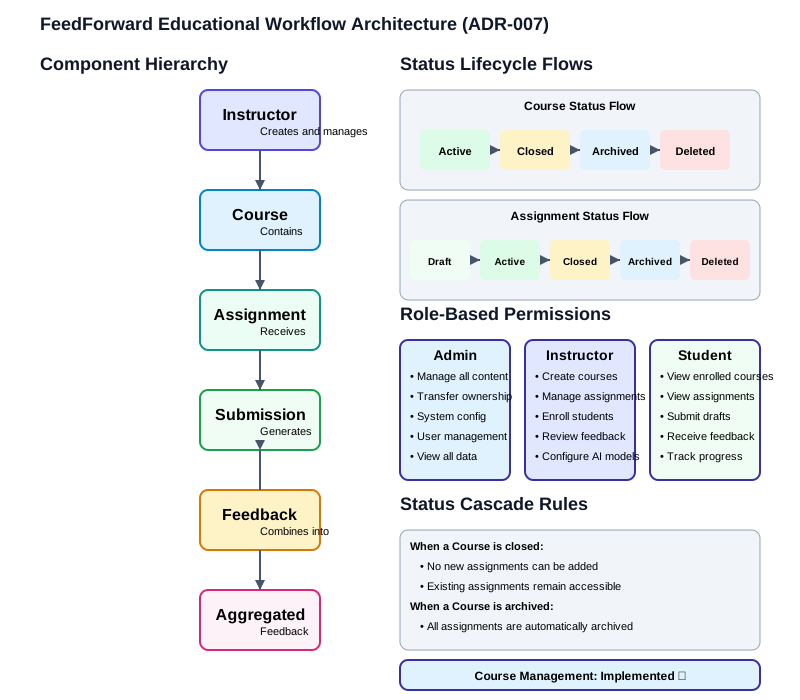
This hierarchy defines both ownership and containment relationships: - Instructors own and manage courses - Courses contain assignments - Assignments receive student submissions - Submissions generate feedback through AI models - Multiple feedback instances may be aggregated into a final view
2. Lifecycle Status Management
Each major component implements status transitions according to ADR-002:
Course Status Flow
active: Normal state, visible to enrolled students, accepts new enrollmentsclosed: No new enrollments, but still visible to existing studentsarchived: Hidden from normal views but accessible via historydeleted: Soft-deleted, hidden but references maintained
Assignment Status Flow (To be implemented)
draft: Instructor creating/editing, not visible to studentsactive: Visible to students, accepting submissionsclosed: No new submissions, but visible for reviewarchived: Hidden from normal views but accessible via historydeleted: Soft-deleted, hidden but references maintained
Submission Status Flow (To be implemented)
draft: Student working on submissionsubmitted: Sent for feedbackprocessing: Generating feedbackcomplete: Feedback availabledeleted: Soft-deleted, hidden but references maintained
Feedback Status Flow (To be implemented)
pending: Queued for generationprocessing: Being generated by AI modelsdraft: Generated but not reviewed by instructorapproved: Reviewed and approved by instructordelivered: Visible to studentdeleted: Soft-deleted, hidden but references maintained
3. Cascade Rules for Status Changes
Status changes in parent components affect child components according to these rules:
- When a course is
closed: - No new assignments can be added
-
Existing active assignments remain accessible
-
When a course is
archived: - All contained assignments are automatically marked as
archived -
Submissions remain available for historical reference
-
When a course is
deleted: - All contained assignments are marked as
deleted - All contained submissions and feedback are preserved but hidden
Similar cascade rules will be defined for assignments and submissions as they are implemented.
4. Role-Based Permissions
The following roles have defined permissions within the educational workflow:
Admin
- Can manage all courses, assignments, submissions, and feedback
- Can transfer ownership of courses between instructors
- Can perform system-wide configuration
Instructor
- Can create, edit, and manage their own courses
- Can enroll students in their courses
- Can create assignments within their courses
- Can review submissions and feedback for their assignments
- Can configure feedback parameters for their assignments
Student
- Can view courses they are enrolled in
- Can view assignments in those courses
- Can create and submit drafts for open assignments
- Can view feedback when it's released
5. Workflow Configuration Options
Each level of the hierarchy allows for configuration that affects how child components behave:
Course Level Configuration
- Enrollment options (open vs. invite-only)
- Default visibility settings for assignments
- Default feedback configuration
Assignment Level Configuration (To be implemented)
- Submission requirements (word count, format)
- Feedback generation settings (models, approach)
- Rubric criteria
- Deadline management
Submission Level Configuration (To be implemented)
- Draft management options
- Feedback delivery preferences
Components Implemented So Far
Course Management (Completed)
- Full CRUD operations for courses
- Status management (active, closed, archived, deleted)
- Student enrollment management
- UI for course listing, creation, and editing
Assignment Management (Completed)
- Creation, editing, and management of assignments
- Status flow implementation (draft, active, closed, archived, deleted)
- Rubric creation and management
- Assignment configuration and templating
Student Experience (Completed)
- Student dashboard with course and assignment overview
- Course view with assignment listing
- Assignment view with detailed information
- Draft submission interface with version control
- Feedback viewing interface
- UI for navigating student workflow
Submission & Feedback Processing (Partial)
- Draft submission and management implemented
- Draft status tracking (submitted, processing, feedback_ready)
- UI for viewing feedback when available
- AI integration for feedback generation (pending)
Consequences
Positive
- Provides a clear organizational structure for educational content and activities
- Ensures data integrity through proper lifecycle management
- Establishes predictable behavior when status changes occur
- Clarifies permissions for different user roles
- Creates flexibility through multi-level configuration options
Negative
- Increases complexity in implementation and testing
- Requires careful cascade handling to maintain data integrity
- May introduce performance considerations with complex querying needs
- Requires thorough documentation to ensure proper usage
Implementation Notes
As we implement each component of the educational workflow, we will update this ADR with additional details, design decisions, and considerations. This document serves as both architectural guidance and a record of implemented features.
- Course Management: Implemented with full lifecycle support and UI (see
/app/routes/instructor.py) - Assignment Management: To be implemented
- Submission Workflow: To be implemented
- Feedback Generation: To be implemented